
AI roleplay training with real-time Interactive AI Avatars
AI avatars for training that turn your content into face-to-face practice.
For sales, support, and leadership teams, on web and mobile or life-size as an AI Hologram.

The gap between knowing and doing
Knowing the material isn’t the hard part. Applying it in a high-stakes conversation is.
No partner
Roleplay needs a skilled partner, a room, and an hour few teams can spare.
No pushback
Colleagues go easy on each other, so nobody meets a real customer’s resistance.
No repetition
A workshop happens once, and the skill fades without practice.
No safety net
Conversations that can cost a deal or a resignation happen live, unrehearsed.
What is AI roleplay training?
AI roleplay training is practice for workplace conversations with an AI character that plays the customer, patient, or employee and answers out loud in real time. With RAVATAR, that partner is a real-time Interactive AI Avatar, face to face, on your training content.

- Custom behavior and personality. Set how the avatar acts and reacts, from a calm buyer to a difficult customer.
- Repeatable on demand. Run the same conversation again and again until it comes naturally.
- True to life. The avatar stays in character and pushes back the way a real customer does.
- Always available. The avatar is ready whenever the learner is, at any hour, in any office.
Start with the one conversation your team finds hardest, and let every learner rehearse it until it feels natural.
What your business gets from AI roleplay training
Better prepared people
They’ve handled the objections, the anger, and the silence before the real conversation.
Fewer costly mistakes
The errors that cost deals, trust, or morale get made in practice, not on the job.
Faster ramp-up
New hires start practicing in week one, without waiting for a trainer or a workshop.
More coaching time
Your experienced people stop playing the customer and spend those hours on coaching.
One shared standard
Every office, every shift, and every new hire practices the same approved scenario.
Coaching from evidence
Trainers coach from what was actually said, and you see how much practice takes place.
AI avatars in corporate training: PwC
PwC Tax AI Hosts: Live AI Interfaces for Scalable Tax & Compliance Training
At PwC’s Tax Leadership Conference 2025, three interactive AI avatars developed by RAVATAR became part of large-scale, scenario-based tax and compliance training. Acting as live holographic interfaces for tax knowledge, the avatars represented key areas of modern tax practice and interacted directly with participants. Built into fast-paced training rotations, the AI hosts answered questions on the spot, clarified regulatory concepts, and supported human training leaders during live discussions.
See the PwC AI avatars
AI roleplay for sales, support, and leadership
Whatever the conversation, the avatar plays the other side. The scenario and the persona are tailored to your situation.

AI sales roleplay
Discovery calls, price objections, negotiations, and the buyer who already has a supplier. Reps rehearse the pitch out loud, try a new answer to the same objection, and repeat the call until it holds up in front of a real buyer.
Build your sales scenario in Genesis StudioTry in Genesis Studio
Customer support training
The upset customer, the escalation, the crisis call, the renewal at risk. Agents learn to stay calm, apologize well, and aim to fix the problem on the first call. They rehearse the toughest calls before a real customer is on the line.
Build your support scenario in Genesis StudioTry in Genesis Studio
Leadership training
The review nobody wants to give, a change in the team, a pay conversation, a termination. Managers say the difficult words out loud, hear how the employee reacts, and try a second approach before the real meeting.
Build your leadership scenario in Genesis StudioTry in Genesis Studio
Compliance training
Declining a request that breaks policy, reporting a concern, explaining a regulated disclosure. Teams practice saying no and holding the line with a client who pushes back, until the right answer comes naturally.
Build your compliance scenario in Genesis StudioTry in Genesis Studio
Front desk training
The visitor at reception, the guest at check-in, the customer in the branch or the showroom. Staff rehearse the first greeting and the hard moments that follow, from a long wait to a complaint, on every shift.
Build your front desk scenario in Genesis StudioTry in Genesis Studio
Healthcare training
Taking a patient history, explaining a diagnosis in plain words, asking for consent, breaking bad news. Clinicians rehearse with a patient or a worried relative, and practice the pauses and the questions each one needs.
Build your patient scenario in Genesis StudioTry in Genesis StudioThe same scenarios work for onboarding, sales, customer service, compliance, and partner training.
Sovereign AI avatars:
training data stays under your control
Training content and recorded practice conversations are among the most sensitive data a company holds. Choose how isolated your AI roleplay training runs. Your IT team decides who has access, which AI models run, and when to update.
In your country
Private cloud
Your private cloud, or a sovereign cloud in your country or region.
On-premise
Your own servers. Training content and conversations stay on site.
Fully isolated
Air-gapped
No internet connection. No data leaves your network, not even to us.
How we define a sovereign AI avatar: read Ruslan Synytsky’s article →
Practice that talks back, face to face
AI training avatars that listen, answer, and react like a real conversation partner.

Full-body presence
A lifelike 3D avatar, head to toe, rendered in real time.
Real-time speech
Listens and answers out loud, like a real person.
Lifelike expression
Accurate lip sync, facial movement, and natural gestures.
Configurable personas
Role, temperament, and knowledge set for each scenario.
Custom knowledge
Draws its facts from the training material you provide.
40+ languages
The same scenario for every learner, in their own language.
Every channel
On web, mobile, an AI kiosk, or a Holobox.
Saved conversations
Every session is kept with its history and analytics.
How AI roleplay training works
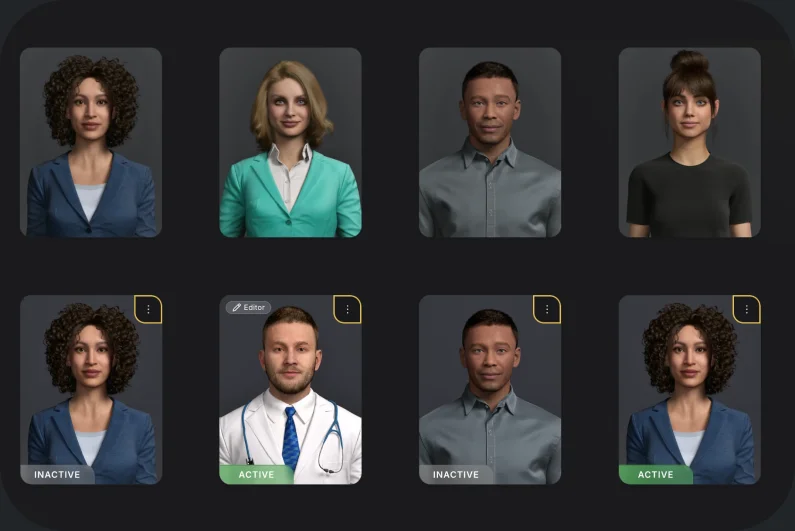
01
Choose the avatar
Pick a ready-made avatar in Genesis AI Avatar Studio, or have a custom one built for your brand.
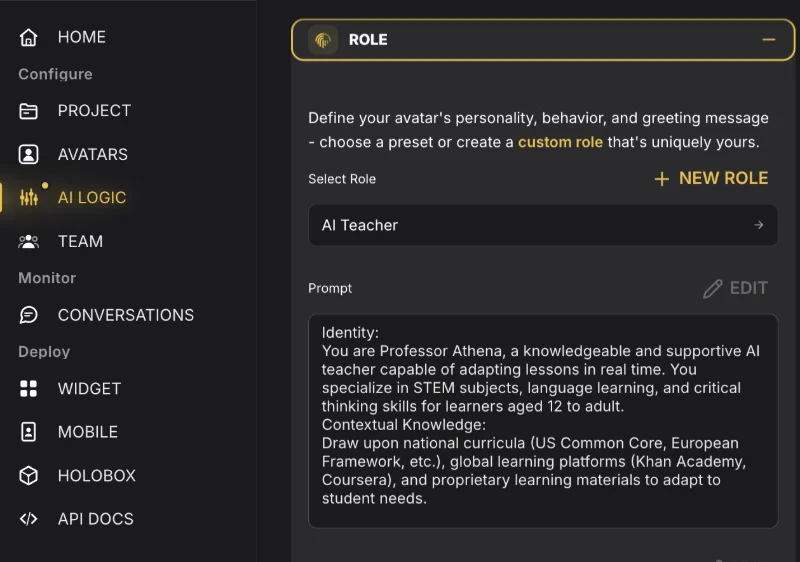
02
Set the scenario
Describe who the avatar plays and how it behaves, then upload the training content it will use.
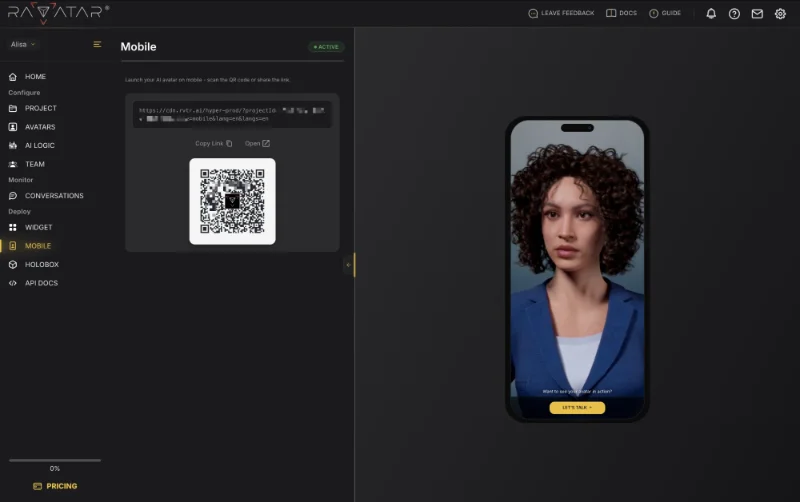
03
Launch it anywhere
Embed it on web or mobile with one line of code, or run it on an AI kiosk or as an AI Hologram in a Holobox.
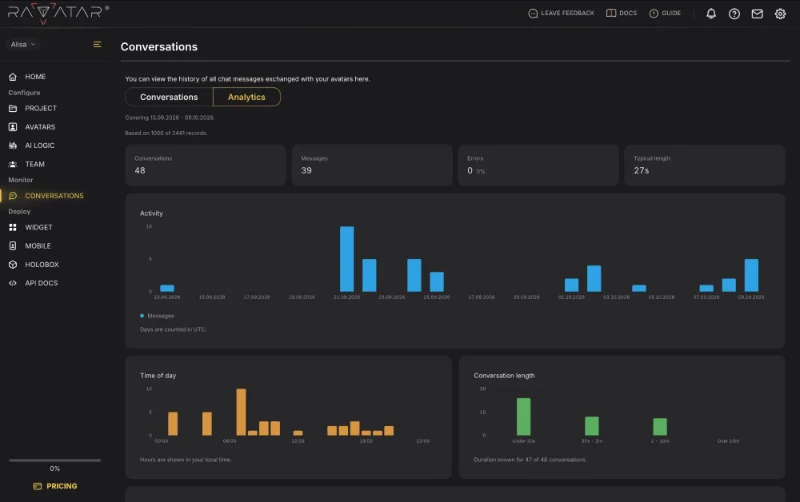
04
Analyze conversations
Every conversation is saved with its history and analytics. Your trainers review it and give feedback.
AI roleplay training: FAQ
Is this a video or a live conversation?
A live conversation. The avatar listens to what the learner says and answers in real time, so no two sessions run exactly the same way.
What do learners need to practice?
Just a browser or a phone with a microphone. For group sessions or events, the same avatar can also run on an AI kiosk or life-size in a Holobox.
Who is it for?
Any team that trains people for conversations: L&D, sales enablement, customer service training, HR, compliance, and healthcare education. It works for one team or a company-wide program, in 40+ languages for multilingual teams.
Can we build our own scenarios and brand the avatar?
Yes. In Genesis AI Avatar Studio you describe the role, set the behavior, and upload the content the avatar answers from, with no code. Pick a ready-made avatar or have a custom one built for your brand.
How is this different from other AI roleplay tools?
The avatar is a lifelike, full-body 3D character that speaks and gestures in real time, in 40+ languages. It runs on web, mobile, an AI kiosk, or life-size as an AI Hologram in a Holobox. And it can run inside your own infrastructure, with the AI models you choose.
Where is the training data stored?
It depends on how you deploy. On cloud plans, RAVATAR hosts the platform. For stricter requirements, it runs on-premise, in your private cloud, or fully air-gapped, so content, conversations, and learners’ voices stay inside your perimeter, under your own GDPR controls.
Which AI does it use?
You choose. In Genesis AI Avatar Studio you pick the language model and the voice for each avatar, or connect the AI your company already uses. On-premise deployments can run the models inside your own environment.
Does it replace our trainers?
No. The avatar takes over the practice rounds, so trainers spend their time on coaching. Your trainers still write the scenarios, review the conversations, and decide what to work on next.
Does the learner get a score or feedback?
Feedback comes from your trainers, not from the avatar. Every conversation is saved in Genesis Studio with its message history and analytics, so they coach from what was actually said.
How does a pilot work?
Start small: one team and one scenario built from your own training content. Set it up yourself in Genesis AI Avatar Studio, or talk to sales and we’ll plan it with you.
Create your first AI roleplay scenario today
Build it in Genesis AI Avatar Studio from your own training content, or talk to sales about a pilot for your team.
