MOBILE
This wizard section lets you launch your AI avatar as a fullscreen experience on mobile devices. No embedding or coding is involved – simply share a ready-made link or let your audience scan a QR code to open the avatar right in their phone’s browser.
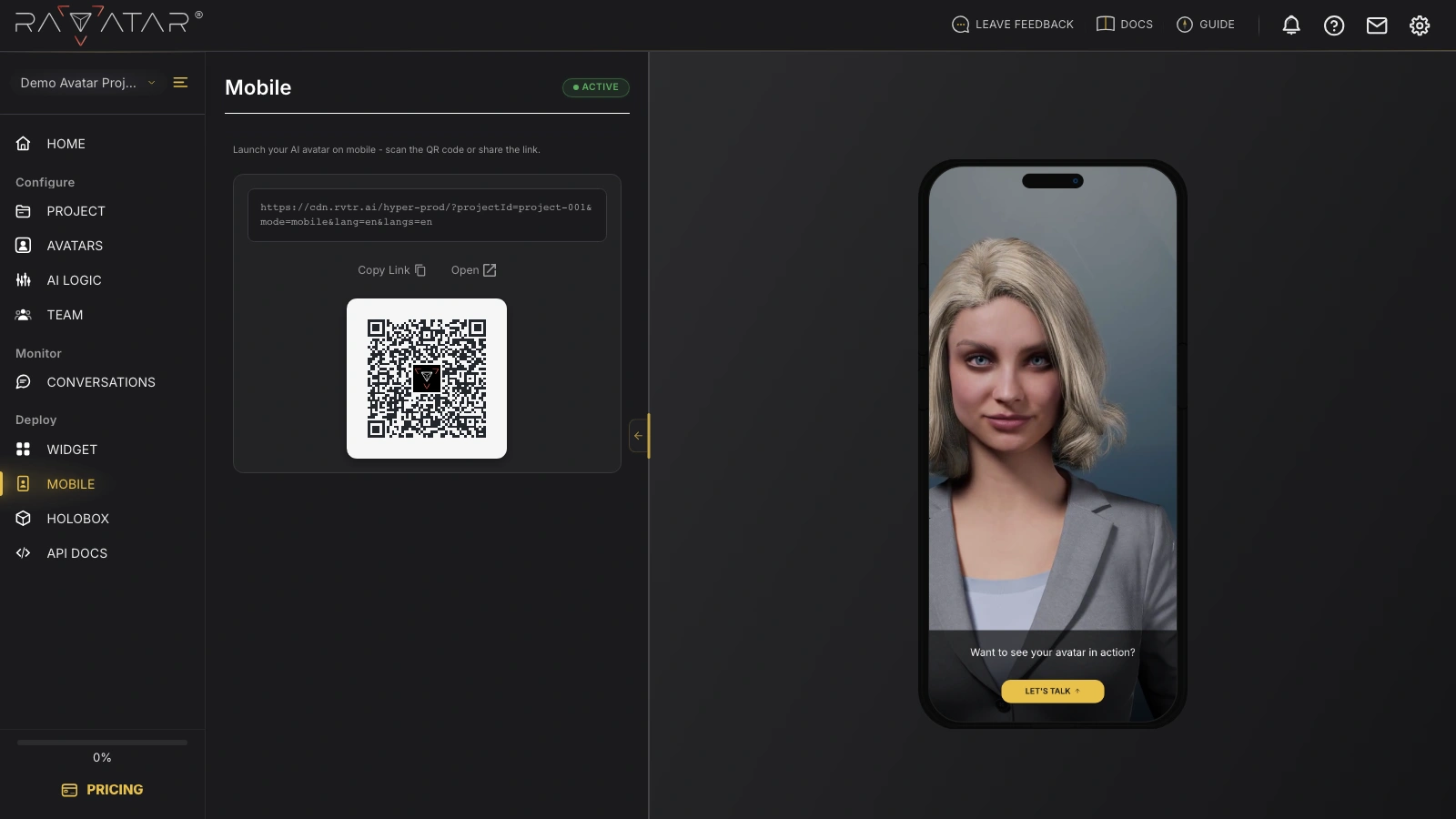
At the top of the card, you’ll find a unique link to your avatar’s mobile experience. It already carries your project’s avatar and language settings, so there’s nothing to configure – the address is ready to use as is.
Two actions below the link help you put it to work:
- Copy Link – copies the address to your clipboard so you can paste it into a message, email, or any other channel.
- Open – launches the mobile experience in a new browser tab, letting you try it yourself before sharing.
Right under these actions sits a QR code that encodes the same link. Point any phone camera at it, and the device opens your AI avatar instantly – handy for printed materials, presentations, or in-person events where typing a URL is impractical.
On the right of the screen, a phone preview shows how your avatar will appear once opened on a mobile device, complete with a LET’S TALK button that starts the conversation.
The mobile link works while your project has an active subscription. If the subscription expires or its auto-renewal is canceled, the Copy Link and Open actions become unavailable until you reactivate it.
To place the same avatar on a website instead, head over to the WIDGET section, or explore Live Preview to see how the conversation experience unfolds.