WIDGET
This wizard section turns your interactive AI avatar into a website chat widget, enabling real-time, AI-powered conversations right on your digital platform. The whole integration comes down to three numbered steps on the left, while the YOUR WEBSITE preview on the right shows exactly how the widget will appear to your visitors once it goes live.
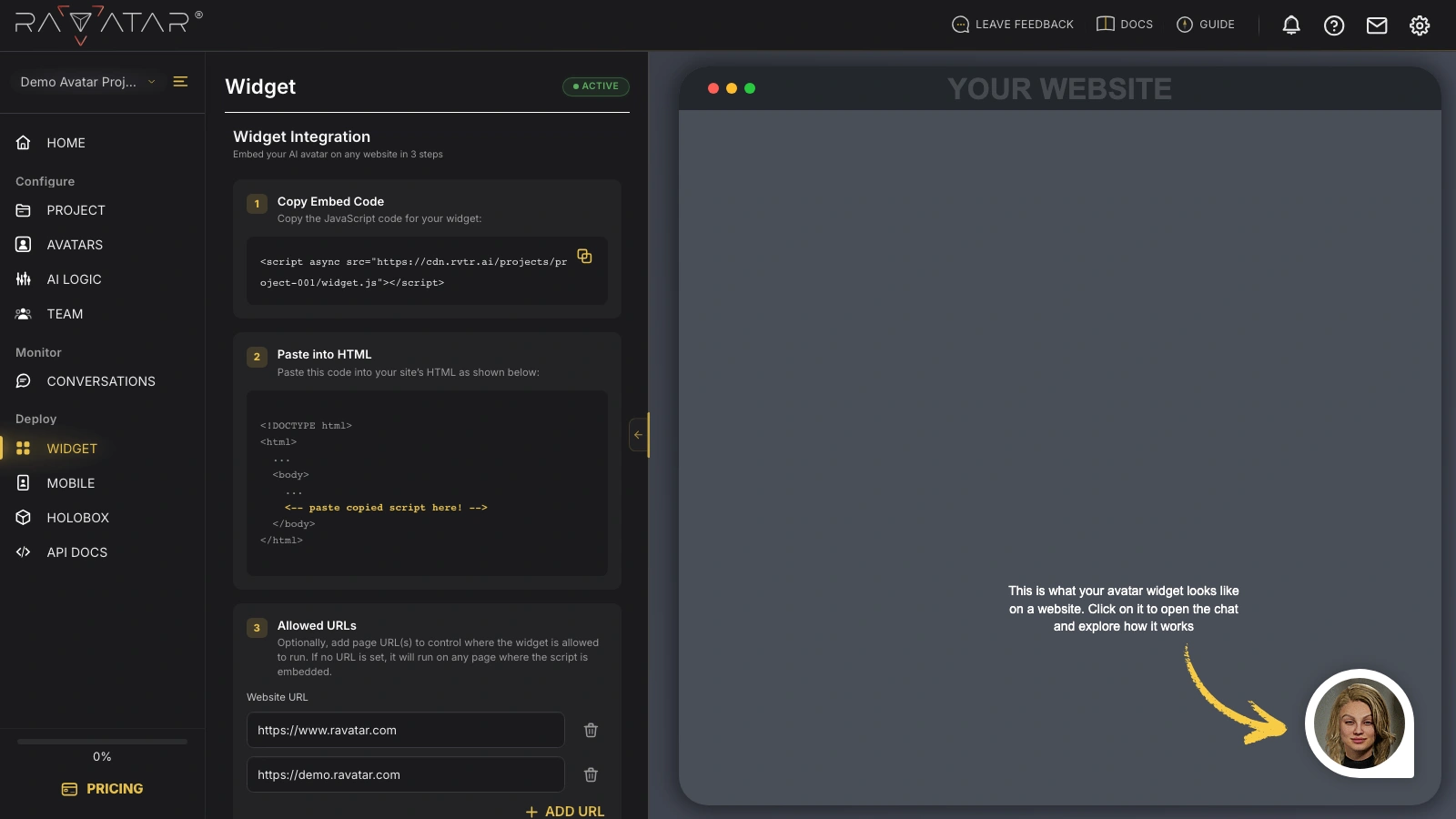
Here’s what each step involves:
- Copy Embed Code – your project’s unique widget script. Use the copy icon next to the snippet to copy it to your clipboard.
- Paste into HTML – insert the copied snippet into your target webpage’s HTML, inside the
<body>section, exactly as the highlighted example shows. - Allowed URLs – optionally, specify the page URL(s) where your widget is permitted to run. If you leave this list empty, the script will work on any domain where it is embedded, without restrictions.
To limit the widget to specific websites, enter the full address of each page (including the protocol part, e.g., https://) into the Website URL field. The Add URL option below creates extra input fields, letting you place your avatar on more than one domain at once, and the trash bin icon next to each field removes redundant entries in case you’ve changed your mind. Once the list is set, Save the changes to your project.
Later on, if you need to update this list by adding or removing addresses, there’s no need to re-integrate the widget – its embed code will remain the same. Simply edit the entries to let Genesis Studio know which pages will host your avatar.
That’s it! Your virtual AI-powered assistant is now available as a chat widget in the bottom-right corner of your updated page, ready to greet, guide, and support users 24/7 the moment they land on your site:
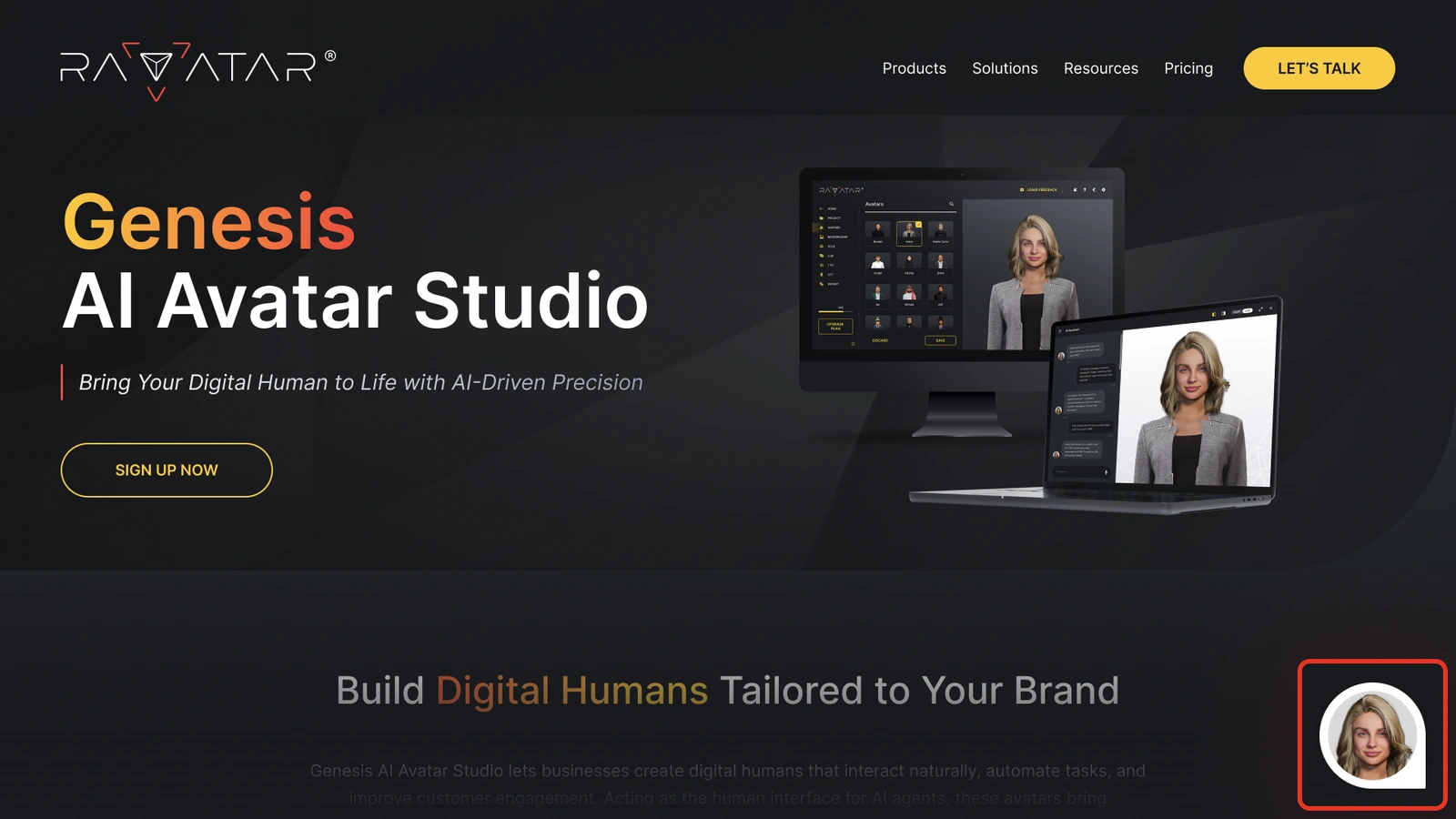
To see the experience in action before publishing, click the avatar bubble in the YOUR WEBSITE preview – it opens the chat so you can explore how the widget works.
You can place your chatbot widget on multiple pages or domains simultaneously – there is no limit to the number of users who can interact with your AI avatar at the same time.
Network and Firewall Requirements
Your AI avatar holds its conversations in real time over WebRTC – the same peer-to-peer technology that powers in-browser video calls. On a typical home or public network this connects automatically, but visitors behind a strict corporate firewall, proxy, or VPN may need their IT team to permit the traffic the widget depends on.
Because the avatar is streamed from the cloud, only outbound access has to be allowed – there are no inbound ports to open on the visitor’s side. If the widget loads but the avatar never finishes connecting in such an environment, a blocked firewall rule is the first thing worth checking.
The widget relies on the standard WebRTC ports: 443 for signaling and TURN over TLS, 3478 and 5349 for STUN/TURN, and the 16384–32768 UDP range for media. UDP is preferred, falling back to TCP on port 443 when UDP is blocked. For a full breakdown of port ranges and firewall rules, see this external WebRTC ports guide.
To bring the same avatar to phones with a shareable link or QR code, head over to the MOBILE section, or explore Live Preview for further details on the conversation experience.